The problem
Ribbon IK gives a limb or a tail smooth, volume-preserving deformation, but building one by hand is a long sequence of steps that has to be repeated identically for every chain: lofting the surface, generating follicles, creating and constraining controls, then wiring the blendshape options. Doing it twelve times for one creature is where mistakes get in.
I wrote the plugin so the setup becomes a single parameterised operation, and so the result is identical every time.
What it does
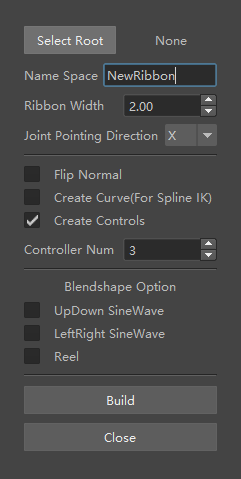
- Builds a ribbon surface and control rig from a selected root joint, with configurable controller count and ribbon width.
- Handles joint pointing direction and normal flipping, which are the two settings that most often need correcting per-chain.
- Optionally generates the curve needed for spline IK, and the control hierarchy, as independent toggles.
- Exposes blendshape options — up/down and left/right sine waves, and reel — for secondary motion without hand-animating each control.
Notes
The interface is deliberately plain. Technical artists reach for a tool mid-task, so every option is visible at once rather than nested behind tabs, and the defaults produce a usable rig without changing anything.
I later taught a session on authoring tools like this one in Maya with Python and MEL for the Advanced 3D Pipeline course at the ETC.